Directed Putaway.
One less decision on every scan.
Every scan-in comes with a suggested storage location, so putaway is more consistent across shifts and your team keeps the final call.
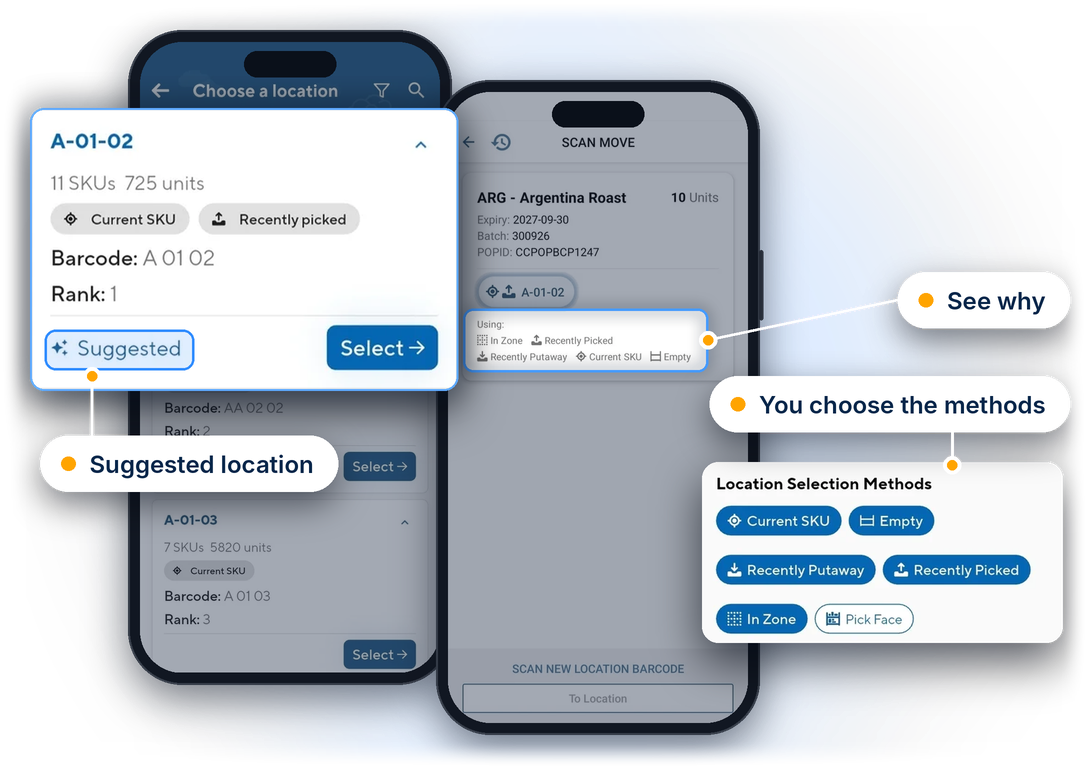
A suggestion on every scan, shaped by your rules
Your rules, built in
Tell CartonCloud which products each location accepts, how efficient it is to pick from, and whether it holds one pallet or many. Add Preferred Zones to products to favour certain areas.
Suggestions where your team already works
Whether they're receiving a purchase order or moving stock in Scan Move, the suggested location appears in the flow your team already uses.
See why, not just where
Locations are ranked from best match to worst. The top one is marked Suggested, with the reasons shown alongside it.
Your team keeps the final call
Confirm the suggestion by scanning the location, or choose another from the list. Stock only moves once the destination is scanned or entered and confirmed, and the movement is recorded either way.
What's included
Confidence on every putaway, built on your own warehouse data
Directed Putaway scores every location that accepts the product, using what CartonCloud already knows about your stock, your picking activity and your warehouse set-up. Your team sees the best options first and always has the final say.

Suggestions as you scan
A location is suggested during purchase order putaway and Scan Move, inside the scanning flow your team already uses. There’s no new screen to learn.

Empty locations when it counts
For full pallets, empty and highly efficient locations rank higher, so pallets aren’t pushed into pick faces or partial slots.

Built around existing stock
Locations that already hold the product are shown as suggestions, so there’s less searching to find where a SKU lives.

Recent activity counts
Locations where the product was put away or picked in the last 14 days score higher, including partial picks.

Preferred Zones
Administrators can set up to 10 preferred zones per product, per warehouse, and import or export them in bulk.

Pick face aware
Switch on pick face suggestions from the filter. Pick faces linked to a product through Replenishment rank above unlinked ones.

Respects pallet capacity
With a pallet quantity set on the product, suggestions stay within a location’s pallet capacity.

Your team stays in control
Choose any location from the list, then filter, sort or search it. Nothing moves until the destination is confirmed.

Switch it off per device
Directed Putaway is on by default for eligible customers. Turn it off any time under Settings, Optional Features.

Fewer decisions, steadier putaway
New starters follow the screen from day one, instead of relying on memory or a supervisor.
Stock lands in more consistent locations across shifts and staff.
Less time spent hunting for an empty location or finding where a SKU already lives.
Judgement stays with your team. The system suggests, staff decide.
A steadier process when volumes rise and temporary staff join for peak.
Included on Premium, Professional, Professional Plus and Enterprise plans. Requires the CartonCloud mobile app, version 6.62.0 or later.

Frequently asked questions