Product Update - View Stock Selection Criteria & Unassigned Stock
Product update! We’ve made some changes to improve visibility for you and your customers’ on the stock selection criteria for incoming Sale Orders.
Published:
February 24, 2021

TABLE OF CONTENTS
Product Update! In this update, we’ve made some changes to increase visibility for you and your customers’ on the stock selection criteria for Sale Orders. This improvement also adds some useful tools for you and your customers to optimise your order and inventory management.
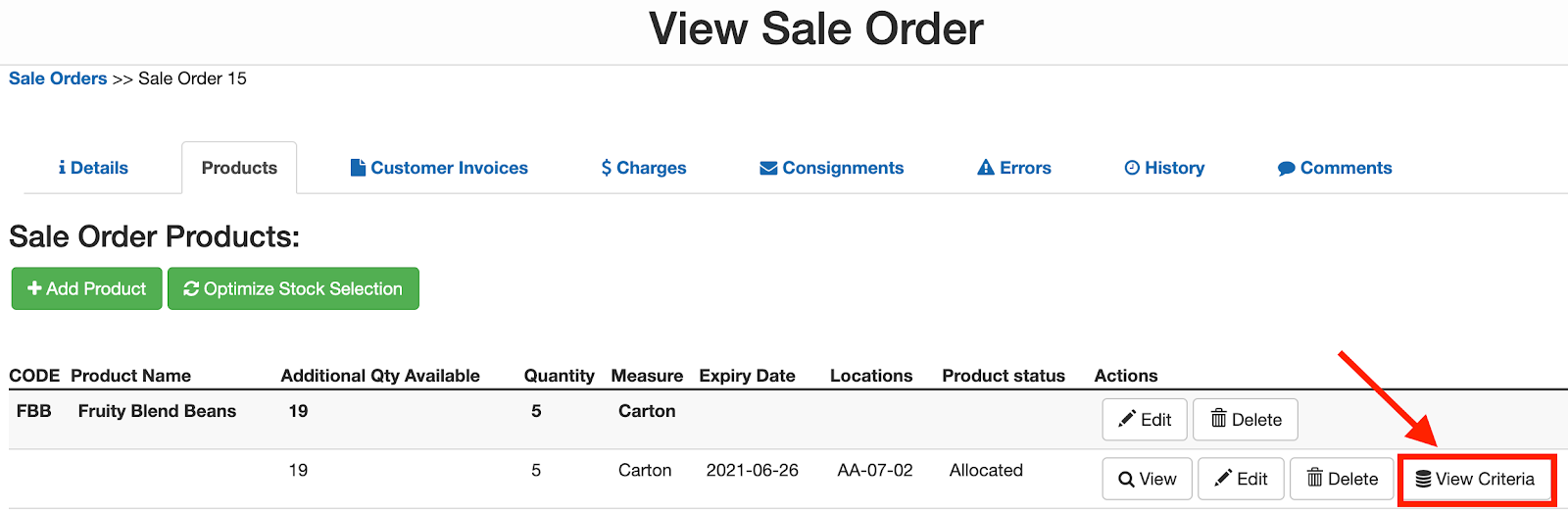
When viewing the Products on a Sale Order, you will now be able to click the ‘View Criteria’ button to see the applicable stock selection criteria that were specified when the order was placed. This is particularly useful for orders that are received via parser or other integration to make it easy to see what, if any, stock selection criteria was provided by the Customer.

Unassigned stock
This enhancement is especially useful when a Sale Order is rejected due to unassigned stock (when there is no stock available in the warehouse that matches the specified stock selection criteria). By clicking on the ‘View Criteria’ you will be able to view what criteria was provided on the customer order that couldn’t be matched against.

We have also made it easier for you and your customers to manage unassigned stock from this screen, with the option to select alternative stock, remove the stock from the Sale Order or wait until appropriate stock arrives in the warehouse before reprocessing the Sale Order.
These changes further streamline the stock selection and order management process within CartonCloud and improve the workflow for both you and your customers. For more information on the ‘View Criteria’ functionality and the process for managing unassigned stock check out our Knowledge Base article.
Explore the resource hub
Tips, tools, downloadable guides and stories from logistics teams who are working smarter.

Get a Free, Honest Read on Your Operation, in About Two Minutes

How to Implement a WMS in Your Small 3PL Business: A Practical Guide
.webp)
This Week in Logistics: Multiple Warehouses, Multiple States, One Standard — How HD Warehousing Does It, With Special Guest Chad Hildebrandt, Owner & COO

August 2026: New Feature Round-Up

Warehouse Software for Cold Storage, Food, and Temperature-Controlled Logistics

This Week in Logistics: Season 2 Returns — US-Canada Tariffs, Oil Volatility, and Panama Canal Cuts All at Once
.webp)
How Do You Know You've Outgrown Basic Warehouse Systems? 7 Signs for Growing US 3PLs
.webp)
CartonCloud Named a 2026 "Great Supply Chain Partner" by SupplyChainBrain
.webp)
Dock Management: How We Built Visibility Into Every Delivery

What's the Best WMS for Small 3PLs That Need an Easy Setup?
.webp)
July 2026 — New Feature Round-up

What US 3PL Operators Really Say About Switching From Slow, Complex WMS Alternatives

CartonCloud vs Competitors: An Honest Comparison from an Implementation Specialist
.webp)
Running Multiple Sites from One WMS System: How HD Warehousing Scaled Without the Complexity
.webp)
This Week in Logistics: The Operator Playbook

Deposco Alternatives: What Growing 3PLs Should Consider

CartonCloud Feature Spotlight: April-June 2026
.webp)
3PL Software Pricing: What You're Actually Paying For (And How to Compare It)

Inside CartonCloud: A Top-Rated 3PL Logistics Software Platform

3PL Software Find the Best Fit for Your Business
