Drag
EXTEND YOUR CARTONCLOUD EXPERIENCE

CartonCloud MCP Server: Connect your AI tools to your data.

Get answers about your orders and stock in plain English, from the AI tool you already use: Claude, ChatGPT, Gemini, Grok, Microsoft Copilot and more. Powered by your live CartonCloud data.
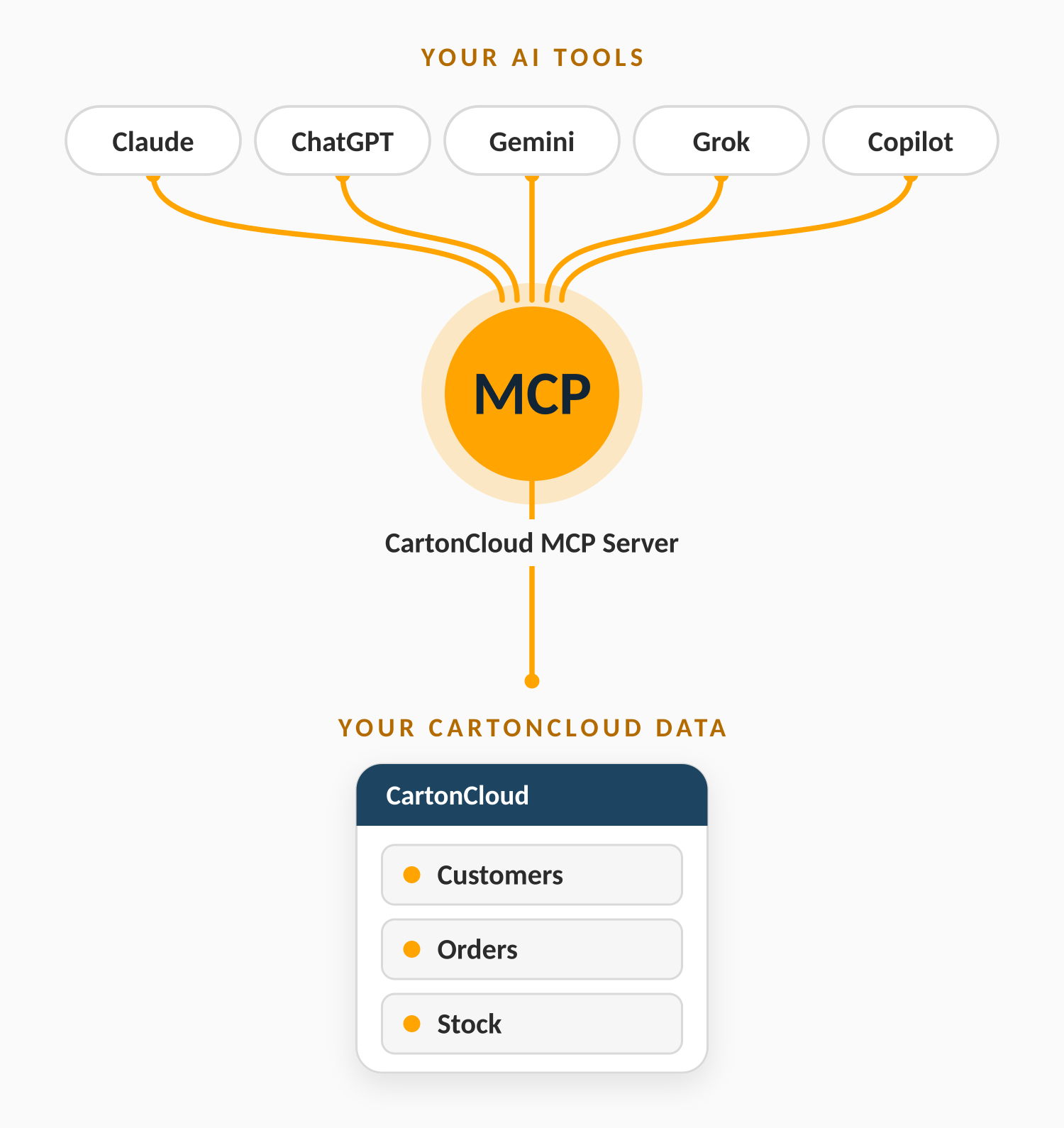
Diagram: Claude, ChatGPT, Gemini, Grok and Copilot connect through the CartonCloud MCP Server to your CartonCloud customers, orders and stock

What is the CartonCloud MCP Server?

Ask your AI assistant about customers, orders and stock in plain English, and get answers from your live CartonCloud data without exporting a report first. The CartonCloud MCP Server connects your own AI tool, such as Claude, ChatGPT or Microsoft Copilot, to your CartonCloud account. It is available on all plans and capabilities are based on user roles.

WHAT YOU CAN DO

Answers from your live data, in your AI tools.

Find customers
See which customers are set up in CartonCloud.
Look up orders
Check inbound and outbound orders, including ones still in draft.
Check stock
Ask how many pallets of a product you have on hand.
Create and update records
Draft an inbound order or update a record. Your AI assistant asks for your approval before it runs an action.
Get how-to answers
Ask how a CartonCloud feature works and your AI assistant searches the CartonCloud Help Centre.
Pull report links
Ask for a link to a report, such as the Customer Stock report.
CartonCloud box with a shield and tick, showing your CartonCloud data is protected
CONNECT WITH CONFIDENCE

You stay in control.

Your AI assistant acts as you, with the same permissions as your CartonCloud user role. The same goes for everyone on your team, so nobody can see or edit data they don't already have access to.

Your password stays private.
The connection never receives it.
You approve actions.
Your assistant asks before it runs an action, so you can review the details first.
No deleting.
Records can't be deleted through the connector. Delete them in CartonCloud.
Works across your tenants.
If you belong to several, your assistant asks which one you mean, or you can name it in your request.
Disconnect any time.
Remove the CartonCloud connector in your AI tool. Nothing is deleted in CartonCloud.
CONNECT IN THREE STEPS

How do you connect your AI tool to CartonCloud?

Setup takes a few minutes. Sign in with your normal CartonCloud credentials, with no API key.
01
Add CartonCloud to your AI assistant.
In your AI assistant's settings, add CartonCloud as a custom connector, using the server address for your region.
02
Sign in with your usual CartonCloud user.
Your AI assistant opens a CartonCloud sign-in. Your password is never shared with it.
03
Start asking.
Ask your AI assistant about your customers, orders and stock.
Fletch

How is the MCP Server different from Fletch?

Fletch is CartonCloud's own AI assistant, built into CartonCloud, our website and our knowledge base. The MCP Server lets you use your own AI tool instead. You choose the assistant, and CartonCloud connects it to your data. Both follow your existing permissions, and neither can delete data.

Meet Fletch

Frequently asked questions

What is an MCP server, and why would you use one with CartonCloud?
An MCP server is a standard connection that lets an AI tool work with business software. With CartonCloud's MCP Server, you can ask Claude, ChatGPT, Gemini, Grok or Microsoft Copilot about orders and stock in plain English, and get answers from your live CartonCloud data instead of exporting reports first.
Is it safe to connect your AI tool to your CartonCloud account?
The connection acts as you, so your AI tool can only see and do what your CartonCloud user role allows. It never receives your password, and it asks for your approval before running an action. You can disconnect at any time, and nothing in CartonCloud is deleted when you do.
Can the AI create or change records in CartonCloud?
It can create and update records, such as a draft inbound order, within your user role. It asks for your approval before running an action, so you can review the details first. It can't delete records through the connector, so you delete those in CartonCloud directly.
What do you need before you connect your AI tool to CartonCloud?
You need a CartonCloud user that can sign in to the web app, because API Client accounts can't connect. You also need an AI assistant account that is allowed to add custom connectors. In company AI workspaces, an owner or admin usually adds the connector first.

Explore more on AI in logistics

Blogs, guides and episodes on what AI really changes in day-to-day logistics operations.
Explore All Resources

Too many demands, not enough time?

Get started with CartonCloud