Paperless Pick and Pack with Vincent
Join CartonCloud Co-founder and CPO Vincent Fletcher onsite at an on-demand 3PL warehouse, as he shows how to optimize workflows and boost accuracy by paperless pick and pack with CartonCloud WMS.
Published:
November 1, 2024

TABLE OF CONTENTS
It’s time to make 3PL picking paperwork a thing of the past! That means no more chasing paper trails or waiting for a pick slip before you can start picking orders. With CartonCloud’s WMS you can easily run your entire 3PL operation seamlessly from the cloud — so your team can pick, pack, and dispatch faster, all in real time. See how you can go paperless in your warehouse with a few easy steps!
TL;DR: Join CartonCloud Co-founder and CPO Vincent Fletcher on the warehouse floor, where he walks through how to use CartonCloud’s mobile app to streamline picking and packing — all without a single sheet of paper.
Q: How can I eliminate paperwork from my warehouse operations?
A: The first step to eliminating paperwork for your warehouse is to ensure you have all orders appear in your WMS so your team can immediately see what needs to be picked.
“In CartonCloud, there are a few different ways to bring orders into our WMS from online storefronts to automate orders. We support CSV uploads — what we call ‘parsers.’ Customers can fill out an Excel template and either upload it into the system or email it in, and the system will automatically process and import the data.
For more established or legacy systems, we also support EDI connectivity, allowing seamless order transfers between systems. And finally, we have an open API, which provides direct integrations with online storefronts like Shopify. As soon as an order is placed in a customer’s Shopify store, it automatically flows into our system. Once the order is processed and shipped, CartonCloud updates the status in both systems and sends the shipping notification to the end customer.” — Javier Hernandez, Implementations Consultant, CartonCloud.
Through software integrations like CartonCloud’s self-managed Shopify integration, you can easily connect your WMS to your customers' online storefront in minutes.
“Most of [their] orders come in from Shopify — they just drop straight into the mobile app immediately and then they pick and pack them by scanning.” — Vincent Fletcher, Co-founder and CPO, CartonCloud

Q: Is it easy to pick orders using the CartonCloud mobile app?
A: Picking your orders with the CartonCloud mobile app is easy. First things first, you need to download the CartonCloud mobile app on iOS or Android, and then pair your device with a Bluetooth scanner to start picking instantly (you can learn more about how to set up warehouse barcode scanning here).
In the CartonCloud WMS mobile app, you can view the order directly from your mobile device, scan the item as you pick to confirm it is the right inventory, and check it off the sales order — without having to stop work to update the system manually. Depending on the orders you are dealing with, there are several data driven picking workflows that we recommend to speed up the picking process:
- For large volumes of identical orders, with a quantity of 1, use CartonCloud’s Split Pick and Pack wave to collect all items in one trip.
- For high volumes of multiple orders (different SKUs), use CartonCloud’s Pick to Tote wave to grab multiple items in one pass, while keeping each order separated and organized into their own tote for easy packing.
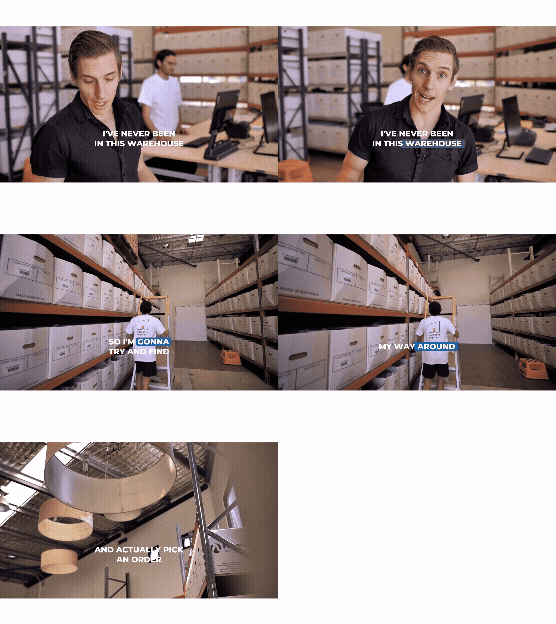
Watch Vincent pick an order using Pick to Tote below!
Find out more about the best e-commerce fulfillment workflows for 3PLs here.
Expert tip: You can use the mobile barcode scanning feature to quickly find warehouse locations by scanning the location barcode. It's so simple and intuitive that even someone who has just stepped foot in the warehouse can find the right warehouse location and locate the correct inventory from the sales order!
Q: How do I prepare my package for dispatch?
A: Once you have all of your items picked, preparing your package for dispatch is a streamlined, click-free process. Simply, hit ‘finish picking’ in the mobile app and the order will be checked off within your WMS automatically.
From there, Pack Screen lets you complete the entire packing process in one smooth step:
- Bring everything back to the pack station.
- Scan the tote to instantly pull up the order details.
- Scan your box label to create a package with pre-set or custom dimensions.
- Scan your products to move each item into the right box.
- Weigh the box on your scale.
- Print off your labels instantly for multiple carriers, such as AusPost, FedEx and more!
“We’ve built this whole process to be used without having to touch the keyboard or mouse throughout. You can just do everything with a barcode scanner.” — Vincent Fletcher, Co-founder and CPO, CartonCloud
Check out this warehouse tutorial to see Pack Screen in action.
Want to know more?
See how CartonCloud can revolutionize your business, streamline your operations and let you scale up your business. Book a FREE DEMO with one of our team today.
Updated November, 2025
FAQs
Q: What if I scan the wrong item while picking?
A: If you happen to scan the wrong item while picking, the CartonCloud mobile app will alert you immediately. CartonCloud’s barcode scanning includes built-in validation and error prompts, so if the wrong item or quantity is scanned, the app flags it instantly. That means you can pick with confidence and greater accuracy.
Q: Can my customers see order updates in real time?
A: Yes, your customers can see order updates in real time using the CartonCloud customer portal. Once they login, they can view live inventory levels, order progress, and dispatch updates — all in real time. This means fewer phone calls and emails asking for updates, and complete visibility for your clients from pick to delivery.
Q: What devices can I use with CartonCloud’s mobile app?
A: You can use a range of Android and iOS devices including smartphones, tablets, and rugged devices on CartonCloud’s mobile app.
Q: How can I instantly receive orders in my WMS?
A: To receive orders instantly in your WMS, you can integrate with your customers online storefronts such as Shopify, WooCommerce, and Amazon through CartonCloud’s software integrations. Once connected, orders flow straight into your WMS and are ready for your team to pick and pack instantly.
Want to know more?
See how CartonCloud can revolutionize your business, streamline your operations and let you scale up your business. Book a FREE DEMO with one of our team today.
Explore the resource hub
Tips, tools, downloadable guides and stories from logistics teams who are working smarter.

Get a Free, Honest Read on Your Operation, in About Two Minutes

CartonCloud’s Commitment to Security: SOC 2 Type 2 Audit Complete

How to Implement a WMS in Your Small 3PL Business: A Practical Guide
.webp)
This Week in Logistics: Multiple Warehouses, Multiple States, One Standard — How HD Warehousing Does It, With Special Guest Chad Hildebrandt, Owner & COO

August 2026: New Feature Round-Up

Warehouse Software for Cold Storage, Food, and Temperature-Controlled Logistics

This Week in Logistics: Season 2 Returns — US-Canada Tariffs, Oil Volatility, and Panama Canal Cuts All at Once
.webp)
How Do You Know You've Outgrown Basic Warehouse Systems? 7 Signs for Growing US 3PLs
.webp)
CartonCloud Named a 2026 "Great Supply Chain Partner" by SupplyChainBrain
.webp)
Dock Management: How We Built Visibility Into Every Delivery

What's the Best WMS for Small 3PLs That Need an Easy Setup?
.webp)
July 2026 — New Feature Round-up

What US 3PL Operators Really Say About Switching From Slow, Complex WMS Alternatives

CartonCloud vs Competitors: An Honest Comparison from an Implementation Specialist
.webp)
Running Multiple Sites from One WMS System: How HD Warehousing Scaled Without the Complexity
.webp)
This Week in Logistics: The Operator Playbook

Deposco Alternatives: What Growing 3PLs Should Consider

CartonCloud Feature Spotlight: April-June 2026
.webp)
3PL Software Pricing: What You're Actually Paying For (And How to Compare It)
Inside CartonCloud: A Top-Rated 3PL Logistics Software Platform
