Switching to a New WMS: How to Avoid Downtime + Keep Orders Flowing
See how real-world 3PLs have learned how to switch to a new WMS by moving to CartonCloud quickly and confidently — preparing their data upfront, leaning on local onboarding support, and using a WMS that’s easy to adopt.
Author:
Olivia Trankina

TABLE OF CONTENTS
I often get asked how to switch to a new WMS without losing downtime, and I always say this: “It comes down to preparation, support, and how easy the system is for your team to learn and use.”
When teams have their data ready and someone walking alongside them during onboarding, they’re often surprised by how quickly everything clicks and feels like a natural extension of their business. I’ve seen teams log in for the first time and start using CartonCloud’s WMS almost immediately (even if they’ve been used to working in older, more complicated systems for years!).
Since CartonCloud is built around real warehouse workflows, there’s no long learning curve. Teams can start receiving stock, picking, packing, and dispatching orders right away, giving them value right from the start.
TL;DR: See how real-world 3PLs have learned how to switch to a new WMS by moving to CartonCloud quickly and confidently — preparing their data upfront, leaning on local onboarding support, and using a WMS that’s easy to adopt.
Q: How can I avoid downtime & keep orders flowing when switching to a new WMS?
A: To avoid downtime and keep your orders still flowing when switching over to a new WMS, it’s important to have all of your data ready right from the start!
When I help businesses with how to switch to a new WMS software, one of the first things we focus on is preparing data. Having things like your customers, products, locations, inventory, and rate cards ready means it can be easily imported into CartonCloud with a simple CSV upload.
I always like to share this onboarding checklist with 3PLs to ensure they have everything they need to get started fast (be sure to right click and hit save to keep your own copy handy!).
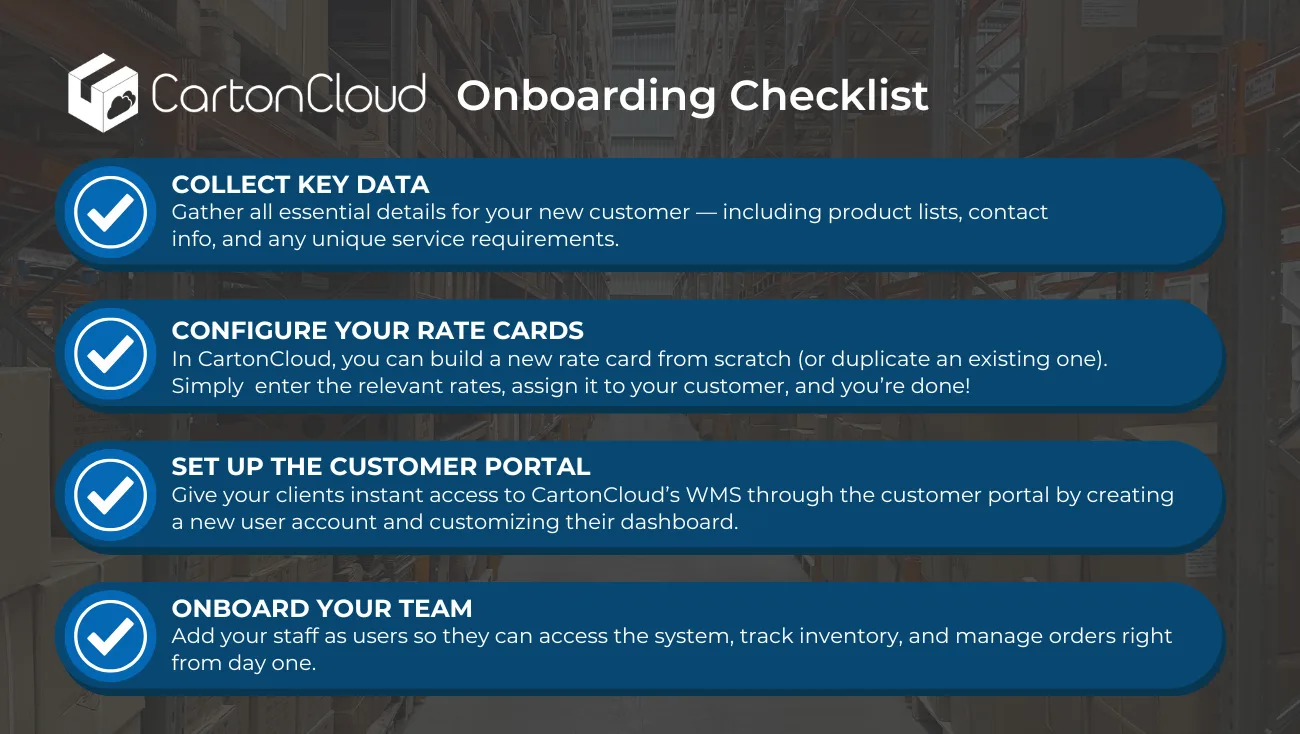
Once your data is prepped, it’s simply a matter of giving your team and customers access to the system and you’re ready to start picking and packing!
Tip: When advising teams on how to switch to a new WMS, I always recommend flagging any integration requirements early in the process. Many of our CartonCloud integrations are available out of the box, however for more complex requirements, our team can help plan custom integrations so everything is ready from day one.
Q: Can I get local support to switch to a new WMS system in the USA?
A: Yes, you can get local US support when you switch to CartonCloud’s WMS software. From day one, you’ll work with a logistics expert who understands the realities of running a warehouse in the US (like myself, or our Implementations Consultant, Javier Hernandez!).
Our goal is to make switching WMS systems feel straightforward from the start and we work with you to ensure you feel supported throughout the entire process from onboarding to your first order going out the door.
“CartonCloud’s support and responsiveness are just exceptional. Having local support makes a real difference, the team are always quick to help, easy to deal with. It feels like a true partnership rather than just a support service!” — Andres Fernandez, Director, Birch3PL
What local support looks like in practice:
- One-on-one onboarding - When you come onboard with CartonCloud, you’re paired with a dedicated onboarding specialist who becomes your main point of contact. We take the time to understand how your operation actually runs and then help customize CartonCloud to fit your business.
“The onboarding was smooth. Olivia really walked us through it; we had weekly meetings with her. Customization was easy.” — Michael Stalbaum, Owner, Philly Cold
- Flexible onboarding, at your pace - Every warehouse is different, so we move at a pace that works for you! Whether you want to get live quickly or roll things out over a few weeks, we’ll check in regularly, answer questions as they come up, and make sure everything stays on track without feeling rushed.
- Self-serve resources when you want them - Alongside our local, hands-on support, you also have access to the CartonCloud Academy and Knowledge Base. I always recommend these if you like to dive in yourself — they’re packed with step-by-step guides and short videos you can use anytime to train your team or explore features at your own pace. (I also like to share specific articles with your team to help fast-track your customization!).
“[Olivia] was always super responsive — whether it was emails or linking different articles.” — Alex Mathis, Production Director, C&C Warehouse
Learn more about getting the best 3PL onboarding for your clients and team here.
Q: How does CartonCloud support fast implementation timeframes?
A: One of the ways that CartonCloud supports fast implementation timeframes is with our easy to use design for fast training!
From what I see working with customers every day, fast implementations come down to one simple thing: how easy the WMS software is for your team to use.
No matter how powerful a WMS looks in a software comparison, if your team can’t figure it out quickly (or actually enjoy using it), then your software is not doing your team any favors. 😅
That’s why our team of devs are always getting out on the warehouse floor to ensure CartonCloud’s is genuinely intuitive, easy to use and built around the way you work! (In 2025, our team went to over 80+ customer site visits just to gather feedback).
CartonCloud’s simple, intuitive interface makes training much faster and helps teams feel confident early on — which can dramatically speed up implementation timelines. I often see teams picking, packing, and moving stock comfortably within minutes, with many calling ease of use one of the biggest reasons they’re able to get up and running so quickly.
“CartonCloud is extremely intuitive to use, adaptable to most mobile devices and its biggest strength is they keep it simple. The screens have just what you need, not superfluous information and options slowing users down. This makes it very easy to train users.” — Nathan Hall, Supply Chain Executive, On Point 3PL
“Our warehouse team love the mobile app which is so easy to use picking or packing stock or moving stock around locations. We are able to train our new or temp staff to use the app with around 10 minutes training and our picking accuracy is near 100%.” — Bruce Walkley, Commercial Director, Flo & Frankie
Find out more about how you can go live within a week with CartonCloud here.
Q: How fast can CartonCloud WMS software be implemented in a warehouse?
A: CartonCloud’s WMS software can be implemented in just hours, especially for those who are ready to start switching WMS systems fast!
CartonCloud is fully configurable, easy to pick up, and intuitive so your team can start using it straight away without long training sessions or complicated setups.
For Philly Cold, switching WMS software meant upgrading from an “old-school” WMS to something more modern — and doing it in a way the whole team felt comfortable with.
“The onboarding process was fairly easy. Olivia really helped walk us through that. We had weekly meetings with her to talk about the nuances of our business.”
The person who used to run the software is a little more old school but she even grasped it! Going from an older product to a more new-school system has worked really well for us.” — Michael Stalbaum, Owner, Philly Cold
For C&C Warehouse, their previous WMS simply couldn’t keep up with the number of new accounts they were bringing on. After weeks spent in software comparisons, the team was relieved to find that switching to CartonCloud was far simpler than they expected.
To support their switch, I took a focused, customized approach to ensure they got exactly what they needed from the system from the start.
“Olivia’s ability to meet customers where they are and really customize the approach made a big difference. It wasn’t ‘here’s everything.’ It was ‘this is what you need right now,’ and then customizing it so we’re set up where we’re supposed to be.” — Greg Cate, Owner, C&C Warehouse
Q: Do I need to buy new hardware to switch to a new WMS system?
A: No, with CartonCloud’s WMS software, you don’t need to buy new software to switch to a new WMS system. CartonCloud is a cloud-based WMS that works on the devices you already have, such as desktops, tablets, mobile phones, and rugged warehouse devices.
CartonCloud is compatible with both iOS and Android devices on mobile (all you need to do is simply download the app on Google Play or the App Store!). Once downloaded, your team can start picking, packing, and moving stock straight away.
Key Takeaways
- Switching WMS software can be smooth and disruption-free with the right preparation. Having your data ready upfront (customers, products, inventory, rates) can help expedite your implementation time.
- CartonCloud’s local, one-on-one support ensures you’re guided through every step of onboarding, with direct access to logistics experts whenever you need help.
- CartonCloud’s ease of use dramatically reduces training time, allowing teams to get started in minutes instead of days — even when onboarding new or temporary staff.
Let’s Make Switching WMS Simple
If you’re thinking about how to switch to a new WMS or deep in some software comparisons to find the right fit for your business, our team is here to help you! Book a free demo with our team to see how to get started fast without disruption.
Explore the resource hub
Tips, tools, downloadable guides and stories from logistics teams who are working smarter.